Agentic Coding
An agentic development toolkit for web teams
Helping cross-functional teams align around quality and alignment

We built a spec-assisted, behavior-driven toolkit for agentic development, because the popular frameworks felt too dev-centric, too focused on solving the wrong problem. What makes it different from Spec-Kit, GSD, Beads, and the rest is that it's built for teams, not just devs. It's organized around a living description of how the system actually behaves, tied to the tests that prove it, readable by, and useful to developers, QA, and product alike.
Spec-driven workflows solve the wrong problem
These tools are good, but their promise is also their main flaw: provide a prompt describing what you want to build, and they bear the brunt of all the planning and execution. Answer some up-front questions and you can go from zero to one hundred in a snap. And truth-be-told, there are many devs who would love having a perfectly refined and approved spec to build from.
Here's the problem with that premise. The cost of producing specs isn't what made big-design-up-front painful. What made it painful was that it forced everyone to agree on the shape of the thing and how to build it before anyone could see it working.
Big-design-up-front (BDUF) optimizes for building the defined thing rather than the right thing.
Generating that same assumption-laden, frozen-in-time artifact faster doesn't fix the flaw. It just lets you commit to a mediocre solution faster.
The problem: documentation comes with a tax
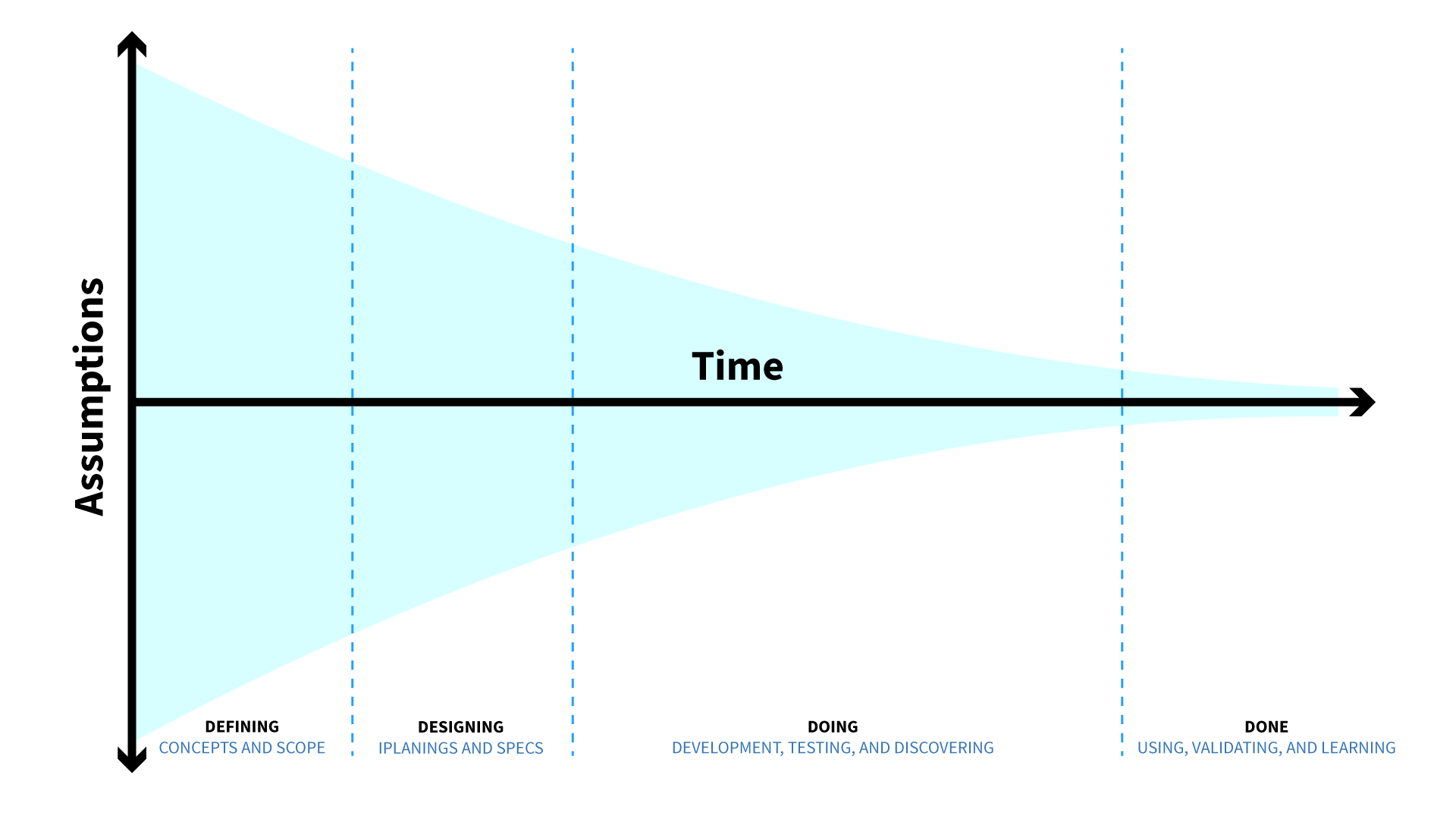
A valid criticism of big design up front is that all the time and effort put into planning and designing at the onset is wasteful, because regardless of how much time you invest, you are entering a cone of uncertainty. Teams inevitably uncover information, and learn things as they get further into designing and building, that suggest a more optimal path forward. And designers and stakeholders, once they see ideas come to life in the browser or on the device, will inevitably say that change is necessary or desired.
But any successful agile practitioner will remind you that abandoning waterfall doesn't mean abandoning planning. Planning is still necessary in an agile workflow. And even in lean and agile workflows, documentation can come with a lot of overhead.
The problem is not that planning and documentation itself takes time. It's the time it takes teams to keep writing and rewriting their own versions of the same requirements based on how they need to use it.
Writing too many versions of the same requirement
Consider this: a team gets together to discuss and write down how they agree some feature should work. That's artifact 1. Then the developer takes that and converts it into a plan (artifact 2) so they can write the code to implement the feature. Code is artifact 3, because it is literally just the secret language developers use to tell the computer what the requirements are and how things should work. Then QA writes test cases (artifact 4), their interpretation of the expected behavior of the system based on their understanding of artifacts 1 and 2. This exists to check whether the computer understood the requirements, after the developer translated them. And of course then you have UAT instructions created to explain to the stakeholders how everything works, which is a product manager or QA doing their best to describe the current state of the system, and hopefully it matches the stakeholders' understanding of what they agreed to have built. And this scenario doesn't even account for Jiras, user stories, or tasks.
This is the documentation tax: the ongoing recreation of role-specific translations of the requirements, amidst projects where client demos, team conversations, and discovery guarantee that change is inevitable and continuous.
The solution: centralize around a single source of truth
Here's the sad part: all this effort captures, at best, a frozen snapshot in time, through a specific lens. Fast-forward 6 months. Can anyone on the team point to a definitive source that describes how the site or application works? Whose job is it to maintain the product documentation? (Spoiler: QA is the only role with both the knowledge and the incentive.) There's usually no centralized, accessible source of truth. So the answer usually lives in team folklore. You track down whoever built the thing and is still around, and have them explain how it works and why (to the best of their recollection).
But what if the description of the system's behavior stayed up to date because it's tied to the tests that prove it, and got updated as a normal part of doing the work rather than as a chore nobody has time for?
Enter the executable specification
What we're describing is an executable specification. The system's rules and business logic live in a document written in plain language, mapped to the automated tests that verify them. Product managers and stakeholders can read it without translation. QA can see exactly which rules are covered by automation and which still need a human. And whoever is building the next increment, human or agent, reads the same file to understand what already exists.
From a technical perspective, the test suite in the codebase keeps an accurate representation of the intended behavior of the code and its logic.
The executable specification doesn't replace a team's preference for creating or using other forms of documentation. It just reduces the dependency on them, and alleviates any responsibility for them to be the source of truth. With a source of behavioral truth, a lot of the traditional documentation can become leaner and more temporal. It can be archived or disposed of once it's used.
This is what the toolkit is built around. All the skills you'd expect for modern software engineering are baked in: test-first thinking and development, code reviews, accessibility checks, built-in refactoring, and so on. But they're assembled to augment human-in-the-center collaboration and to prioritize alignment across a cross-functional team over raw output. Instead of a prompt-in, code-out developer workflow, it optimizes for human-in-the-loop iterative gates. And instead of one size fits all, it's a toolbox you adapt to how your team already works.
Four core artifacts in the toolkit
The toolkit is a series of custom Claude commands, skills, and agents that can be invoked via Claude Code within a codebase. Four artifacts are at the core of the toolkit. While they are heavily related, they are distinct and can be used independently.
Roadmap: context for what's coming
/Roadmap is a snapshot of what's in motion, and it sets context for what's coming.
It tracks what's in flight now, what's next, and what's deferred. It's a parking lot for work that surfaces mid-build but shouldn't derail the current scope. It gives whoever's on the ground, human or agent, enough foresight to avoid coding themselves into a corner.
It is not a substitute for real strategy artifacts like journey maps and vision decks: tangible things meant to persuade. And it's not meant to be exhaustive. It's a reminder of key things that are coming, or that we need to figure out how to deal with later. When using this doc as part of the workflow, completed work automatically moves to a "recently completed" section.
Example: you are working on an increment of functionality for a feature. There are three more increments you are aware of that will need to be shipped in the next month, but are not on deck for the current release. The roadmap makes them visible to any person or agent working in the codebase, so they can anticipate how the feature will change and build it in a resilient way.
Feature: evergreen descriptions of system behavior
/Feature is the team's source of truth for how things work.
Each block, component, global element, or observably functional element in your application gets its own feature markdown file. It exists as the evergreen documentation. It describes what a capability does right now, along with a concrete example of what each rule looks like when working as intended. It follows a Given/When/Then structure (based on Behavior Driven Development) and uses business language rather than jargon. At the bottom, a coverage table maps each rule to its automated tests and exposes the gap for what's not covered, to guide manual QA. This is the source of truth for the team and for regression testing, and it's the document that gets automatically updated as part of the workflow rather than after it.
If future increments of functionality for this feature are planned and tracked in the roadmap, they're surfaced here too.
Spec: functional requirements for in-flight work
/Spec captures the thinking behind a specific change.
Specs are temporal; they only define what needs to be done in the moment. They are requirements, the design rationale, the open questions, the edge cases, draft acceptance criteria, technical notes. It's thorough and it's useful in the short term.
Specs provide the context needed to develop a solid technical plan, and inform changes to features. Once the change ships, the spec has done its job and can be archived. This is the artifact other workflows try to point back to; here it's disposable because it's only relevant to whatever change is on deck.
Example: a team wants to introduce a new feature (or change an existing one) on their site. They collaborate and draft up their understanding of how it should work and why. This could be a user story and acceptance criteria, or a brief functional doc, and they pass it into the spec. The spec extrapolates on it, imposes a defined structure, and the team refines the details until they are satisfied. Once a spec is created, it prompts the team to generate the plan.
Plan: the technical implementation details and build sequence for a spec
/Plan is the technical, test-driven blueprint for implementing a spec.
Its primary audience is the agent, but it's written to be reviewed by human experts too. It breaks the work into independently testable steps, defaults to writing tests before code, and treats each step as a seam: a natural place for someone else to evaluate, commit, and optionally open a PR.
Here's the flow, going from spec to build
The flow runs spec → plan → feature → build, but not everything needs to follow the full path, and that's what keeps it flexible.
Start with a spec describing the change. Then a branch: is this an observable change to how the feature or system behaves? If not (a refactor, a migration, an infrastructure or CI change) there's no new behavior to document, so you skip straight to planning. Behavior docs stay reserved for actual behavior, which is what keeps them meaningful. If yes, you check whether a feature doc already exists for that capability and either update it or create a new one, before building. The behavior gets described first; the code comes second.
Then the build loop, one plan step at a time. Write the failing test. Write the code. Watch the test pass. Run the code review (three subagents checking for code quality, accessibility, and performance). Refactor and retest. Commit. Repeat for the next step. Each step runs in a clean context and stands on its own, so a long plan doesn't accumulate confusion, and every step is a checkpoint a human can inspect.
The final step closes the loop deliberately: run the full end-to-end suite, update the feature doc to lock in how the system actually behaves now (including any pivots that happened mid-build), archive the spec and plan as shipped, and open the PR.
The living document ends the cycle reflecting the current reality, because updating it is the last step, not an afterthought.
The toolkit, expanded for discovery and quick fixes
Two additions came out of using this across real work (including building this site), and both exist to bend the workflow toward how people behave rather than forcing the reverse.
Explore: pausing to consider options
/Explore sits upstream to help teams evaluate and critique other possibilities.
Agentic tools have a strong bias toward getting to an approved plan and building it. They'll happily converge on the first workable idea and push toward implementation. The problem is that this encourages teams to latch onto the first idea that fits, rather than generating and considering different potential solutions. In a worst case, agentic workflows train teams to bypass product discovery altogether.
Explore exists to encourage teams to pause and consider options before committing to a solution. Based on Matt Pocock's Grill-me, it runs an interview-driven session that withholds recommendations early, so it draws out your thinking instead of rubber-stamping its own, generates and stress-tests multiple candidate solutions, and probes trade-offs before anyone commits. It writes no code. Its only output is a discovery summary that can feed a spec, if you decide to proceed.
Example: a team hosts an ideation session and ends up with three seemingly viable paths forward. Each has trade-offs. They upload some sketches and summaries of each solution into Claude and run the explore command. The command talks through the solutions, poking holes in the concepts. As a result, the team increases their confidence around a single idea, adjusts and refines that concept, and then moves forward to begin prototyping it.
Retrofit: accommodating how people work
/Retrofit is a safe bypass for small changes.
Not every tweak deserves the full spec-plan-feature march. Consider adding a backoffice field, a hover state, or a one-line fix, where making and checking the change by hand takes less time than stepping through the process. Developers will (correctly) just make those changes. The risk is that each undocumented one-off slowly erodes the tests and behavior docs the rest of the workflow relies on.
Retrofit lets the developer work the way they want, then arrives after the fact like a senior architect: it reconciles what you said you did against what the diff actually shows, surfaces the gaps, runs the reviews, and proposes the missing tests, docs, and cleanup. It applies only what you approve.
Both of these serve to meet people where they work, without letting the codebase's resilience decay as it grows.
Here are the principles that hold it all together
Be a toolbox, not a funnel
These are helper commands and skills a team taps into where they're useful, not a machine everyone has to feed in order, and not something the team should become dependent on. Use explore when the problem is fuzzy. Skip the feature doc when there's no behavior change. Reach for retrofit on a small fix. The scaffolding is there to augment the team, not to become a dependency.
Match how a good team would want to work even without AI
Consider the design before writing code. Write tests first. Bake in refactoring. Work in small pieces and shift testing left, catching issues closest to where they're introduced instead of volleying them back and forth with QA later. The agent doesn't invent a new discipline here; it draws from decades of software engineering best practices that have simply been out of reach for many small teams.
Keep people in charge
Every stage has a human checkpoint: reviewing a spec, approving a plan step, confirming what retrofit changes. Teams collaborate on the functional spec for a feature, then use the tooling to expand it, add depth, and surface edge cases. The AI writes code and tests in conjunction with human oversight, guidance, pushback, and realignment. It's not in the passenger seat, but it's not driving alone either.
Be cross-functional by design
The living specification is written to be read by product and QA, not just engineering. The plan is built around review seams. The roadmap gives everyone the same glimpse of what's coming. This is the part that most distinguishes it from tooling organized around a single developer picking their coding assistant: the workflow assumes a team, and it's shaped so the whole team can see and shape the work, not just the programmer.
The payoff is something the whole team can trust, which is the thing all the up-front planning was trying and failing to give you in the first place.
The whole point is to improve quality
A lot of people (and executives) see agentic coding as a means of expediting the delivery of work. In other words, the goal is speed. Velocity. Other spec-driven workflows are built around that: reducing planning time and aiming for more code, faster. And let's be honest, that also means cheaper. When code is cheap to generate, it becomes more disposable. But what happens when you're left with functioning, but quickly produced and poorly documented, systems over time? What happens when you have multiple cooks in the kitchen, all leaning on agentic workflows to churn out code?
As many agile development heroes often remind us: speed is the byproduct of quality.
If you want to create better quality software faster, you have to improve the quality. Quality is the result of strong alignment between design, engineering, and product. Quality is the result of resilient architecture, and codebases that are habitable for others. It's building in a way that makes fearless refactoring possible, so that change is easy because you have automated tests supporting human QA testers.
This approach aims to help with that, and I'll sure it will continue to change and evolve as we put it through more use and see how it fares. I'll be sharing the actual .md files and prompts shortly, but in the meantime just reach out if you would like to know more.
I'm working on exporting all the Claude commands and skills to remove project-specific context and creating a github repo so others can try out the toolkit.
Resources & Inspiration
There's a lot of inspiration for this approach and what we've put together. Check out these resources if you want to explore more.
AI Coding Principles
I lot of what I'm doing here was inspired by Matt Pocock's work. I liked what he was doing, specifically how he takes an approach that encourages teams to take small incremental steps rather than passing a PRD to an agent and having it take over all the steps, planning through execution. It has already evolved a lot since I first checked it out. The workflow I describe in this post aligned with a lot of what he has been doing, but adapted for how our team works and the types of projects we do.
BDD is Not About Testing
Daniel Terhorst-North talks about how Behavior Driven Development has been misconstrued as a testing framework, but was originally created to shift the focus toward business behavior and value, helping developers think about software design rather than just checking for bugs.
20 Years of BDD
Daniel Terhorst-North emphasizes that effective work relies on shared understanding—a collective grasp of the "why," the "what," and a humble acknowledgment of what is currently unknown.
What's Wrong with Big Design Up Front (BDUF)?
Austin Govella addresses some misconceptions about Big Design Up Front, reframing to surface the underlying problems teams face, and argues for the value of design and documentation.